What AI API is Free? Top Picks & How to Get Started

In the rapidly evolving landscape of artificial intelligence, the ability to integrate powerful AI capabilities into applications, services, and workflows has become an essential competitive advantage. From natural language processing to computer vision and speech recognition, AI APIs offer developers a streamlined path to leverage cutting-edge models without the need for extensive machine learning expertise or computational resources. However, for many developers, startups, and hobbyists, the initial hurdle often lies in cost. The question, "what AI API is free?" is a common one, driving the search for accessible tools that enable experimentation, learning, and even the deployment of initial prototypes without upfront investment.
This comprehensive guide delves into the world of free AI APIs, meticulously exploring the top platforms and services that offer no-cost access to their powerful artificial intelligence models. We'll demystify the nuances of "free"—distinguishing between truly free, freemium models, and generous trial periods—and equip you with the knowledge to make informed decisions. More importantly, we'll provide a practical, step-by-step guide on how to use AI API offerings, ensuring that whether you're building a simple chatbot, analyzing sentiment, or prototyping an image recognition system, you can get started with confidence and minimal expenditure. Our goal is to empower you to tap into the immense potential of AI, proving that innovation doesn't always come with a hefty price tag.
Understanding the Landscape of Free AI APIs
Before diving into specific offerings, it's crucial to understand what "free" truly means in the context of AI APIs. The term can be multifaceted, encompassing several models:
- Truly Free (Open-Source / Community-Driven): These are often open-source projects or community-maintained APIs that genuinely offer unlimited or very generous free usage, typically self-hosted or provided through grant-funded initiatives. The "cost" here might be in the form of setting up and maintaining the infrastructure yourself, or accepting community-level support.
- Freemium Models: This is perhaps the most common approach. Providers offer a base level of service for free, with limitations on usage (e.g., number of requests, data processed, features available, or speed). Once these limits are exceeded, users are prompted to upgrade to a paid plan. This model is excellent for learning, prototyping, and applications with low usage volumes.
- Free Tiers / Trials: Major cloud providers (Google, AWS, Azure) frequently offer extensive "free tiers" or "free trials" for their AI services. These tiers typically last for a specific period (e.g., 12 months) or come with specific monthly usage allowances that are renewed. They are designed to allow users to explore and develop on their platforms without immediate cost, with the expectation that successful projects will eventually transition to paid usage.
- Developer Programs / Credits: Some companies offer credits to developers, startups, or academic institutions, allowing them to use their APIs for free up to a certain monetary value. These are often time-limited or contingent on specific program eligibility.
Understanding these distinctions is key to choosing the right "free ai api" for your project, ensuring that you don't encounter unexpected costs down the line. For most aspiring developers and small-scale projects, freemium models and free tiers from major providers will offer the most robust and accessible starting points.
Top Picks: What AI API is Free for Different Use Cases
The realm of AI is vast, covering various domains like natural language processing (NLP), computer vision, speech recognition, and more. Thankfully, there are free AI API options available across these categories. Here, we highlight some of the leading providers and platforms that offer free access, detailing their capabilities and common limitations.
1. Large Language Models (LLMs) and Natural Language Processing (NLP)
LLMs are revolutionizing how we interact with text, enabling everything from content generation to complex reasoning. NLP APIs build upon this, offering more specialized functionalities like sentiment analysis, entity extraction, and translation.
a. Hugging Face Inference API & Open-Source Models
Hugging Face has become synonymous with open-source AI, particularly in the NLP space. They host thousands of pre-trained models from various developers and institutions, making them easily accessible.
- Free Offerings:
- Hugging Face Inference API: Provides a free-tier Inference API for many popular models, allowing you to quickly test models without setting up your own infrastructure. While there are rate limits and fair-use policies, it's an excellent way to experiment with models like text generation, summarization, translation, and more.
- Open-Source Models: You can download and run many of the models locally on your own hardware for free. This requires computational resources and some technical setup but offers ultimate flexibility and no API call limits.
- Key Capabilities:
- Text generation (e.g., GPT-2, Llama 2 (via open-source distribution))
- Text summarization
- Translation
- Sentiment analysis
- Question answering
- Named Entity Recognition (NER)
- Image classification, object detection (for multimodal models)
- How to Get Started: You'll typically interact with Hugging Face models either through their web-based demos, their Python
transformerslibrary for local inference, or their Inference API for quick online testing. Accessing the Inference API usually requires an API token, obtainable after creating a free Hugging Face account.
b. Google Cloud AI Platform (Free Tier) - Natural Language API
Google, a pioneer in AI research, offers a robust suite of AI services through its Google Cloud Platform (GCP). Their Natural Language API is a standout, providing powerful text analysis capabilities.
- Free Offerings: Google Cloud provides a "Free Tier" that includes various AI services. For the Natural Language API, this typically includes:
- 5,000 units per month for sentiment analysis, entity analysis, syntax analysis, and content classification.
- 1,000 units per month for entity sentiment analysis.
- A "unit" often refers to a block of 1,000 characters processed.
- Key Capabilities:
- Sentiment Analysis: Determines the emotional tone of text.
- Entity Analysis: Identifies and labels entities (people, places, events, etc.) within text.
- Syntax Analysis: Breaks down text into components, providing insights into grammatical structure.
- Content Classification: Categorizes text into predefined topics.
- Entity Sentiment Analysis: Combines entity extraction with sentiment for specific entities.
- How to Get Started: Sign up for a Google Cloud account (requires a credit card for verification, but you won't be charged unless you exceed the free tier limits). Enable the Natural Language API in your GCP project, create an API key, and use their client libraries (available for Python, Node.js, Java, etc.) or REST API to send requests.
c. Cohere (Free Tier)
Cohere is another significant player in the LLM space, focusing on enterprise-grade language AI. They offer a generous free tier for developers.
- Free Offerings: Cohere provides a free tier that typically allows for millions of tokens processed per month across their various language models. This is ample for extensive experimentation and development.
- Key Capabilities:
- Generate: Text generation for various tasks (creative content, summaries, code, etc.).
- Embed: Generates high-quality embeddings for text, useful for semantic search, recommendation systems, and clustering.
- Classify: Categorizes text based on custom labels.
- Summarize: Condenses longer texts into concise summaries.
- Chat: A conversational AI endpoint for building chatbots.
- How to Get Started: Create a free Cohere account, obtain an API key, and begin making requests using their SDKs (Python, JavaScript) or REST API. Their documentation is comprehensive and beginner-friendly.
2. Computer Vision APIs
Computer vision APIs allow applications to "see" and interpret images and videos, enabling functionalities like object detection, facial recognition, and image moderation.
a. Google Cloud AI Platform (Free Tier) - Vision AI
Building on their deep learning expertise, Google's Vision AI is a powerful tool for image analysis.
- Free Offerings: As part of the Google Cloud Free Tier, Vision AI typically includes:
- 1,000 units per month for label detection, web detection, explicit content detection, and landmark detection.
- 1,000 units per month for face detection.
- 1,000 units per month for Optical Character Recognition (OCR) for text in images.
- A "unit" usually corresponds to one image processed.
- Key Capabilities:
- Label Detection: Identifies broad categories of objects, scenes, and activities in images.
- Text Detection (OCR): Extracts text from images in various languages.
- Face Detection: Locates faces within an image and detects facial attributes.
- Landmark Detection: Identifies popular natural and man-made structures.
- Logo Detection: Detects popular product logos.
- Web Detection: Finds visually similar images and related web entities on the internet.
- SafeSearch Detection: Moderates images for explicit content.
- How to Get Started: Similar to the Natural Language API, sign up for GCP, enable the Vision AI API, create an API key, and use their client libraries or REST API.
b. Amazon Web Services (AWS) AI Services (Free Tier) - Rekognition
AWS offers a vast array of cloud services, and their AI portfolio includes Amazon Rekognition, a scalable computer vision service.
- Free Offerings: The AWS Free Tier typically includes a generous allowance for Rekognition for the first 12 months after signing up:
- 5,000 images per month for image analysis (labels, faces, content moderation).
- 5000 units of face vectors per month for face search.
- 5 minutes of video analysis per month.
- Key Capabilities:
- Object and Scene Detection: Identifies objects, scenes, and activities.
- Facial Analysis: Detects faces, analyzes emotions, and estimates age ranges.
- Facial Recognition: Compares faces and searches for known faces in collections.
- Content Moderation: Detects inappropriate or unsafe content in images and videos.
- Custom Labels: Train custom models to detect specific objects or scenes unique to your business.
- Text in Image: Extracts text from images.
- How to Get Started: Create an AWS account, configure your AWS credentials, and use the AWS SDKs (available for Python, JavaScript, Java, etc.) or REST API to interact with Rekognition.
c. Microsoft Azure AI (Free Tier) - Vision Studio (formerly Computer Vision API)
Microsoft's Azure AI platform provides comprehensive cognitive services, including robust computer vision capabilities.
- Free Offerings: Azure provides a free tier for many of its Cognitive Services, including Vision. This typically includes:
- A certain number of transactions per month (e.g., 20 transactions per minute, 5,000 transactions per month) for various Vision functionalities like image analysis, OCR, and face detection.
- Key Capabilities:
- Image Analysis: Describes image content, generates smart crops, detects common objects.
- Optical Character Recognition (OCR): Extracts printed and handwritten text from images.
- Face Detection and Analysis: Detects human faces, identifies attributes like age, emotion, and presence of accessories.
- Spatial Analysis: Analyzes real-time video streams to detect the presence and movement of people.
- Custom Vision: Build, deploy, and improve your own image classifiers and object detectors.
- How to Get Started: Sign up for an Azure account, create a Cognitive Services resource in the Azure portal, obtain your endpoint and API key, and use their SDKs or REST API.
(Potential Image Suggestion: A diagram illustrating the workflow of a typical computer vision API call, from image upload to result interpretation.)
3. Speech AI APIs (Speech-to-Text & Text-to-Speech)
Speech APIs convert spoken language into text (speech-to-text) or synthesize human-like speech from text (text-to-speech), enabling voice assistants, transcription services, and accessible content.
a. Google Cloud AI Platform (Free Tier) - Speech-to-Text & Text-to-Speech
Google's offerings in speech AI are highly regarded for their accuracy and natural-sounding synthesis.
- Free Offerings:
- Speech-to-Text: 60 minutes of audio processing per month for free.
- Text-to-Speech: 1 million characters per month of standard voices and 500,000 characters per month of WaveNet voices for free.
- Key Capabilities:
- Speech-to-Text: Converts audio to text in over 120 languages and variants, supports real-time streaming and batch processing.
- Text-to-Speech: Synthesizes natural-sounding speech from text using a wide range of voices and languages, including advanced WaveNet voices.
- How to Get Started: As with other Google Cloud services, sign up, enable the respective APIs, obtain an API key, and use their SDKs or REST API.
b. Amazon Web Services (AWS) AI Services (Free Tier) - Transcribe & Polly
AWS provides robust services for both speech-to-text and text-to-speech through Amazon Transcribe and Amazon Polly.
- Free Offerings (within 12-month free tier):
- Amazon Transcribe: 60 minutes of audio per month for transcription.
- Amazon Polly: 5 million characters per month for standard voices and 1 million characters per month for neural voices.
- Key Capabilities:
- Amazon Transcribe: Automatically converts speech to text, supports various audio formats and languages, and can differentiate speakers.
- Amazon Polly: Turns text into lifelike speech, offering a wide selection of languages and voices, including Neural Text-to-Speech (NTTS) for even more natural voices.
- How to Get Started: Create an AWS account, configure credentials, and use AWS SDKs or REST API to interact with Transcribe and Polly.
c. Microsoft Azure AI (Free Tier) - Speech Service
Azure's Speech Service is a unified offering for speech-to-text, text-to-speech, speech translation, and speaker recognition.
- Free Offerings: Azure provides a free tier for the Speech Service, typically offering:
- 5 audio hours per month for speech-to-text.
- 500,000 characters per month for standard voices in text-to-speech.
- 50,000 characters per month for neural voices in text-to-speech.
- Key Capabilities:
- Speech-to-Text: Highly accurate transcription with custom models for specific vocabularies.
- Text-to-Speech: Generates natural-sounding speech in various voices and languages, including highly expressive neural voices.
- Speech Translation: Real-time, multi-language speech translation.
- Speaker Recognition: Verifies and identifies individual speakers.
- How to Get Started: Sign up for Azure, create a Speech Service resource, obtain your keys, and use their SDKs or REST API.
4. Other Notable Free/Freemium AI API Options
Beyond the major cloud providers and dedicated LLM platforms, several other services and approaches offer free ways to leverage AI.
a. RapidAPI & Other API Marketplaces
RapidAPI hosts thousands of APIs, many of which offer free tiers or freemium models. While not exclusively AI, it's a valuable resource for discovering specific AI functionalities.
- Free Offerings: Search for "free AI API" or specific AI tasks (e.g., "face recognition API free") to find providers offering free plans. These can range from simple data analysis to specialized machine learning models.
- Key Capabilities: Varies widely by provider, but can include everything from niche NLP tasks to image manipulation and predictive analytics.
- How to Get Started: Create a RapidAPI account, browse the marketplace, subscribe to a free tier API, and RapidAPI will provide code snippets in various languages to integrate it.
b. Open-Source AI Libraries (Self-Hosted)
For those with technical prowess and computational resources, running open-source AI models locally is the ultimate "free" option. Libraries like TensorFlow, PyTorch, Scikit-learn, and the aforementioned Hugging Face Transformers allow you to build and deploy models without any API costs.
- Free Offerings: The software itself is free. The cost comes in hardware (CPU, GPU), electricity, and your time for development and maintenance.
- Key Capabilities: Limitless, depending on the models you choose to implement. You can customize, fine-tune, and deploy models for virtually any AI task.
- How to Get Started: Learn Python, install the necessary libraries, download pre-trained models or train your own, and integrate them into your applications. Tools like Llama.cpp and Ollama simplify running LLMs locally.
(Potential Image Suggestion: A comparison table showing the pros and cons of using cloud AI APIs vs. self-hosting open-source models.)
Summary of Top Free AI APIs
To provide a clearer overview, here's a table summarizing some of the top "what AI API is free" options, focusing on their main domain and free tier specifics.
| AI API Provider / Service | Primary Domain(s) | Free Tier / Usage Limit | Ideal For | Key Considerations |
|---|---|---|---|---|
| Hugging Face | LLMs, NLP, Vision | Inference API (rate-limited), Open-Source models | Experimentation, rapid prototyping, custom model deployment (self-hosted) | Free tier rate limits; self-hosting requires technical expertise and hardware. |
| Google Cloud AI | NLP, Vision, Speech | Generous monthly units/minutes across services | Early-stage development, learning, small-scale projects | Requires GCP account (credit card for verification); free tier expires for some services after 12 months. |
| AWS AI Services | NLP, Vision, Speech | Generous monthly units/minutes across services | Early-stage development, learning, small-scale projects | Requires AWS account (credit card for verification); free tier expires for some services after 12 months. |
| Microsoft Azure AI | NLP, Vision, Speech | Generous monthly transactions/characters | Early-stage development, learning, small-scale projects | Requires Azure account (credit card for verification); free tier usually forever, but with stricter rate limits. |
| Cohere | LLMs, NLP | Millions of tokens/month (very generous) | LLM-powered applications, text generation, embeddings, classification | Focused on text/LLMs; good for higher-volume free usage in NLP. |
| RapidAPI Marketplace | Various (discovery) | Varies by API (many freemium options) | Discovering niche or specialized AI functionalities | Quality and limits vary widely; requires careful vetting of individual APIs. |
| Open-Source Libraries | All AI domains | Software is free, hardware cost for self-hosting | Maximum customization, privacy, large-scale deployment without API costs | Requires significant technical expertise, infrastructure, and maintenance. |
How to Use AI API: A Step-by-Step Guide
Now that we've explored what AI API is free, let's walk through the general process of "how to use AI API" offerings. While specific steps might vary slightly between providers, the core workflow remains consistent.
(Potential Image Suggestion: A flowchart illustrating the general steps to use an AI API: Choose API -> Sign Up -> Get API Key -> Install SDK -> Make Request -> Process Response.)
Step 1: Define Your Use Case and Choose the Right API
Before anything else, clearly define what you want your application to do. Do you need to: * Generate creative text or summarize articles? (LLM/NLP) * Detect objects in images or moderate content? (Computer Vision) * Transcribe audio or synthesize speech? (Speech AI) * Perform sentiment analysis on customer reviews? (NLP)
Based on your use case, select an AI API provider that offers the specific functionality and has a free tier that meets your anticipated usage. Consider the language support, accuracy, and ease of integration.
Step 2: Sign Up for an Account and Access Credentials
For most cloud providers and commercial APIs, you'll need to create an account. * Cloud Providers (Google, AWS, Azure): Typically require a credit card for identity verification, even for free tiers. Don't worry, you won't be charged unless you explicitly exceed the free limits or upgrade your plan. * Dedicated AI Platforms (Hugging Face, Cohere): Often only require an email and password.
Once your account is set up, navigate to the API or service section. You'll usually find an option to generate an API Key or Access Token. This key is a unique identifier that authenticates your requests to the API. Treat your API key like a password—keep it secure and never embed it directly in client-side code or public repositories.
Step 3: Explore Documentation and SDKs
Every reputable API provider offers comprehensive documentation. This is your bible for understanding: * Endpoint URLs: The specific web addresses you'll send your requests to. * Request Formats: How to structure your data (e.g., JSON, form-data) for sending to the API. * Response Formats: What kind of data you can expect back from the API. * Authentication Methods: How to include your API key in requests (e.g., Authorization header, query parameter). * Rate Limits: How many requests you can make within a certain time frame. * Client Libraries (SDKs - Software Development Kits): Most providers offer SDKs for popular programming languages (Python, Node.js, Java, Go, etc.). These libraries wrap the complex HTTP requests, making it much easier to interact with the API using native language constructs. Using an SDK is highly recommended over directly making HTTP requests.
Step 4: Install the Necessary Client Libraries/SDKs
If you're using an SDK, you'll need to install it in your development environment. This is typically done via package managers: * Python: pip install google-cloud-language (for Google NLP), pip install boto3 (for AWS), pip install azure-cognitiveservices-vision-computervision (for Azure Vision), pip install cohere (for Cohere), etc. * Node.js: npm install @google-cloud/language, npm install aws-sdk, npm install @azure/cognitiveservices-vision-computervision, npm install cohere-ai, etc.
Step 5: Write Code to Make API Calls
This is where you integrate the AI API into your application. Here's a conceptual example using Python (the exact code will vary greatly based on the chosen API and language):
import os
# Example for a hypothetical AI API for sentiment analysis
# This is illustrative and not a working example without specific API details.

# --- Step 2 & 4: Assume you've set up API key and installed SDK ---
# For security, load API key from environment variable or a secure config file
API_KEY = os.environ.get("MY_AI_API_KEY")
if not API_KEY:
    raise ValueError("MY_AI_API_KEY environment variable not set.")

# --- Step 5: Make an API Call ---
def analyze_sentiment(text_to_analyze: str):
    # This part would be specific to the SDK or API you are using
    # For instance, using a hypothetical 'MyAISentimentClient'
    try:
        # Initialize client (e.g., from an SDK)
        # client = MyAISentimentClient(api_key=API_KEY) # Example client initialization

        # Prepare payload
        payload = {
            "text": text_to_analyze,
            "language": "en"
        }

        # Make the actual API request
        # response = client.analyze(payload) # Example API call
        # For demonstration, let's simulate a response:
        if "excellent" in text_to_analyze.lower() or "love" in text_to_analyze.lower():
            response = {"sentiment": "POSITIVE", "score": 0.95}
        elif "bad" in text_to_analyze.lower() or "hate" in text_to_analyze.lower():
            response = {"sentiment": "NEGATIVE", "score": 0.90}
        else:
            response = {"sentiment": "NEUTRAL", "score": 0.50}

        return response

    except Exception as e:
        print(f"An error occurred: {e}")
        return None

# --- Example Usage ---
if __name__ == "__main__":
    review1 = "This product is absolutely excellent! I love its features."
    review2 = "It's okay, nothing special but it gets the job done."
    review3 = "I hate how buggy this software is; it's truly bad."

    print(f"Analyzing: '{review1}'")
    sentiment1 = analyze_sentiment(review1)
    if sentiment1:
        print(f"  Sentiment: {sentiment1['sentiment']}, Score: {sentiment1['score']:.2f}\n")

    print(f"Analyzing: '{review2}'")
    sentiment2 = analyze_sentiment(review2)
    if sentiment2:
        print(f"  Sentiment: {sentiment2['sentiment']}, Score: {sentiment2['score']:.2f}\n")

    print(f"Analyzing: '{review3}'")
    sentiment3 = analyze_sentiment(review3)
    if sentiment3:
        print(f"  Sentiment: {sentiment3['sentiment']}, Score: {sentiment3['score']:.2f}\n")
This snippet demonstrates the general flow: 1. Authentication: Securely provide your API key. 2. Request Construction: Format your input data according to the API's requirements. 3. API Call: Send the request using the SDK method or a direct HTTP request. 4. Response Handling: Parse the API's JSON response to extract the desired AI output.
Step 6: Error Handling and Best Practices
When building with any API, especially free ones, robust error handling is crucial. * Rate Limit Exceeded: Free tiers almost always have rate limits. Implement exponential backoff for retries to avoid being blocked. * Authentication Errors: Ensure your API key is correct and being sent properly. * Bad Request Errors: Check that your input data format matches the API's expectations. * Network Errors: Handle connection issues gracefully.
Best Practices: * Security: Never hardcode API keys. Use environment variables, secure configuration files, or secret management services. * Monitoring: Keep an eye on your API usage through the provider's dashboard to ensure you stay within free tier limits. * Efficiency: Batch requests where possible to reduce the number of API calls and stay within rate limits. * Asynchronous Calls: For high-throughput applications, use asynchronous programming to avoid blocking your application while waiting for API responses.
By following these steps, you'll be well-equipped to "how to use AI API" effectively, leveraging the power of artificial intelligence in your projects.
XRoute is a cutting-edge unified API platform designed to streamline access to large language models (LLMs) for developers, businesses, and AI enthusiasts. By providing a single, OpenAI-compatible endpoint, XRoute.AI simplifies the integration of over 60 AI models from more than 20 active providers(including OpenAI, Anthropic, Mistral, Llama2, Google Gemini, and more), enabling seamless development of AI-driven applications, chatbots, and automated workflows.
Limitations and Considerations of Free AI APIs
While free AI APIs are invaluable for learning and prototyping, it's important to be aware of their inherent limitations, especially if you envision scaling your project to production.
- Rate Limits and Usage Caps: This is the most common restriction. Free tiers are designed to offer a taste, not a feast. Exceeding limits will either block your requests or incur charges. For applications requiring consistent high volume, free tiers quickly become insufficient.
- Performance (Latency & Throughput): Free tiers may operate on shared, lower-priority infrastructure. This can lead to higher latency (slower response times) and lower throughput (fewer requests per second) compared to paid tiers. This is critical for real-time applications or those requiring rapid processing.
- Feature Restrictions: Some advanced features, custom model training capabilities, or specific model versions might be exclusive to paid plans.
- Data Privacy and Security Concerns: While major cloud providers generally have robust security, always review the data handling policies. Are your inputs stored? How long? Is sensitive data processed? For highly confidential data, self-hosting or using APIs with explicit privacy assurances might be necessary.
- Scalability for Production: Free tiers are fundamentally not built for production-level scalability. If your application gains traction, you'll quickly hit limits that necessitate an upgrade. Planning for this transition early is wise.
- Support and SLAs: Free users typically receive community-level support or limited customer service. Critical issues might not get immediate attention. Service Level Agreements (SLAs) guaranteeing uptime and performance are almost exclusively for paid plans.
- Model Choice and Flexibility: While open-source platforms like Hugging Face offer immense choice, free tiers from commercial providers might limit your access to their most advanced or specialized models.
- Vendor Lock-in (Potential): Investing heavily in one provider's ecosystem, even through their free tier, can create inertia when considering alternatives, especially if your application relies on unique features of that platform.
Understanding these limitations helps set realistic expectations and informs the decision of when to transition from a "free ai api" to a paid or more robust solution.
When to Elevate: Transitioning from Free to Unified API Platforms
As your project grows beyond initial experimentation or low-volume usage, the limitations of free AI APIs become apparent. You might encounter: * Frustration with rate limits: Constantly hitting usage caps stifles development and user experience. * Performance bottlenecks: Slow response times impact application usability. * Lack of diverse model access: The need for a wider variety of specialized or cutting-edge models from different providers. * Complexity of multi-API management: Integrating multiple APIs from different providers (e.g., Google for NLP, AWS for Vision) becomes a logistical headache with varying authentication, data formats, and documentation. * Reliability and support concerns: Production applications require guaranteed uptime and responsive technical support.
This is precisely where unified AI API platforms step in, offering a compelling solution. These platforms aggregate multiple AI models from various providers under a single, simplified API interface. They act as a powerful intermediary, abstracting away the complexities of managing numerous connections, while providing enhanced features.
Consider XRoute.AI, a cutting-edge unified API platform designed to streamline access to large language models (LLMs) for developers, businesses, and AI enthusiasts. By providing a single, OpenAI-compatible endpoint, XRoute.AI simplifies the integration of over 60 AI models from more than 20 active providers, enabling seamless development of AI-driven applications, chatbots, and automated workflows.
XRoute.AI directly addresses many of the challenges posed by relying solely on individual free AI APIs: * Unified Access: Instead of juggling multiple API keys and SDKs for different providers (e.g., one for OpenAI, another for Cohere, another for a specialized vision model), XRoute.AI offers a single, consistent interface. This significantly reduces development time and complexity, making it easier to integrate a wide array of AI functionalities. * Broad Model Choice: With access to over 60 models from 20+ providers, developers are no longer limited to the offerings of a single platform. This flexibility allows for choosing the best model for a specific task, optimizing for performance, cost, or unique capabilities. * Low Latency AI: XRoute.AI focuses on delivering high-performance interactions, ensuring your AI-powered applications respond quickly and smoothly, crucial for real-time user experiences. * Cost-Effective AI: By routing requests intelligently and potentially offering volume discounts or optimized pricing across providers, XRoute.AI can lead to more cost-effective AI solutions than managing individual subscriptions. * OpenAI-Compatible Endpoint: This feature is a game-changer for developers already familiar with the OpenAI API structure. The familiarity allows for rapid migration and integration without a steep learning curve. * High Throughput and Scalability: Built for production, XRoute.AI offers the necessary infrastructure to handle increasing request volumes, ensuring your application scales effortlessly with demand. * Developer-Friendly Tools: Beyond the unified API, the platform provides tools and support designed to empower developers, simplifying the entire AI integration lifecycle.
For projects transitioning from the "what AI API is free" phase to a production-ready stage, platforms like XRoute.AI represent a strategic shift. They offer the reliability, performance, and simplified management needed to build sophisticated, scalable, and low latency AI solutions without the overhead of directly managing a complex multi-vendor AI infrastructure. It's about moving from individual puzzle pieces to a powerful, integrated toolkit.
Future Trends in AI API Accessibility
The landscape of AI APIs is constantly evolving, with several trends shaping future accessibility:
- Continued Growth of Open-Source LLMs: The rapid development and release of powerful open-source large language models (like Llama, Mistral, Falcon) will continue to increase "free AI API" options through self-hosting or community-supported inference endpoints. This democratizes access to cutting-edge AI.
- Specialized and Domain-Specific APIs: Beyond general-purpose LLMs, we'll see a rise in highly specialized AI APIs tailored for specific industries (e.g., healthcare, finance, legal) or tasks (e.g., code generation, scientific research). Many of these will start with freemium models.
- Edge AI and On-Device Processing: As AI models become more efficient, more processing will move to the edge (on-device, in browsers), reducing reliance on cloud APIs for certain tasks and potentially offering "free" processing once the model is deployed.
- AI Orchestration and Agentic Workflows: Platforms that help developers chain multiple AI API calls and models together to create complex, autonomous agents will become more prevalent. Unified APIs like XRoute.AI are at the forefront of this trend, simplifying the management of these intricate workflows.
- Ethical AI and Explainability APIs: As AI becomes more pervasive, there will be increasing demand for tools and APIs that help developers build more ethical, fair, and explainable AI systems, with some basic versions likely offered for free or at low cost.
These trends suggest a future where AI will be even more accessible, with a richer ecosystem of free, freemium, and unified solutions designed to cater to a diverse range of developer needs and project scales.
Conclusion
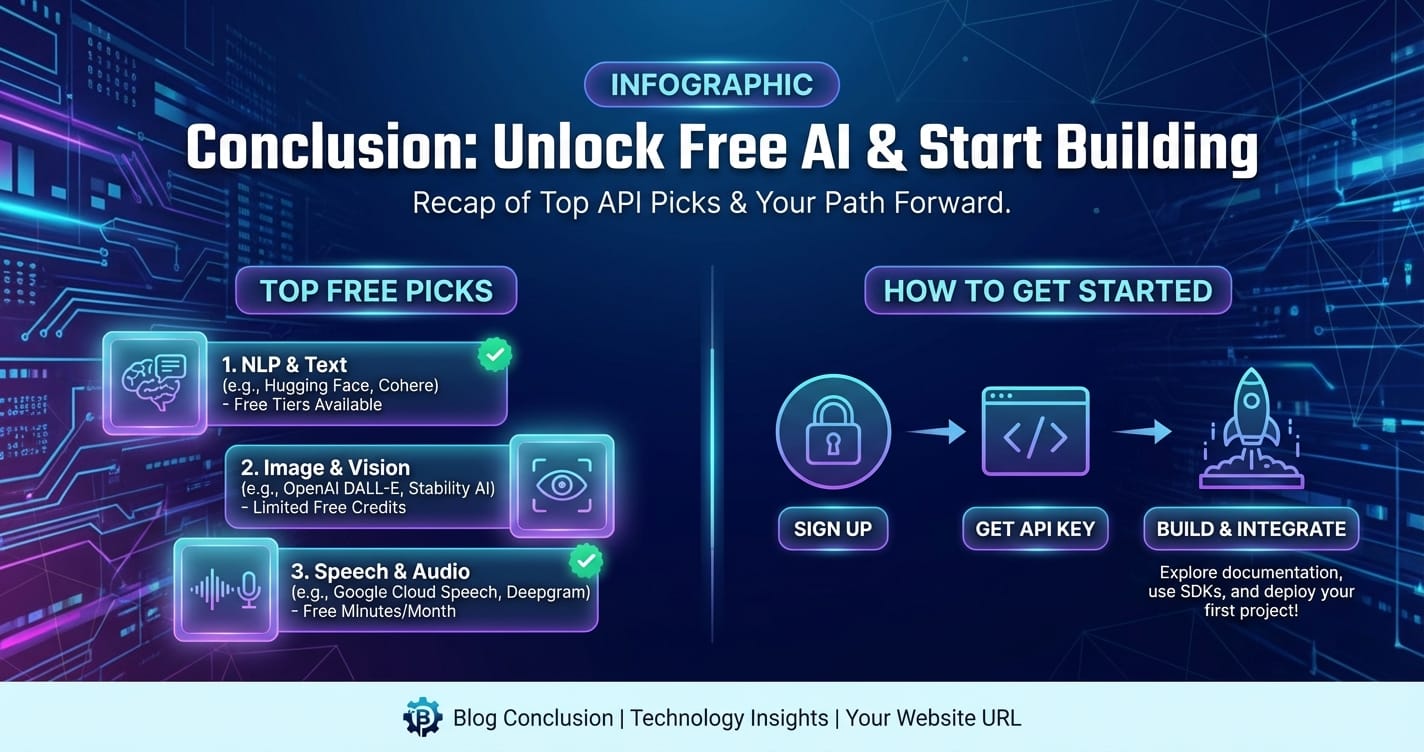
The question "what AI API is free?" is more relevant than ever in today's innovation-driven world. We've explored a vibrant ecosystem of options, from the generous free tiers of cloud giants like Google, AWS, and Azure, to the open-source community stronghold of Hugging Face, and the developer-friendly offerings of Cohere. These platforms provide an invaluable starting point for anyone looking to experiment, learn, or prototype AI-powered applications without significant financial outlay. They offer a tangible pathway to understanding "how to use AI API" functionalities across natural language processing, computer vision, and speech recognition.
However, as projects mature and scale, the inherent limitations of these free services—rate limits, performance variability, and management complexity—often necessitate a transition to more robust, integrated solutions. This is where platforms like XRoute.AI emerge as crucial enablers. By unifying access to a vast array of cutting-edge LLMs and other AI models through a single, OpenAI-compatible endpoint, XRoute.AI offers the low latency AI, cost-effective AI, high throughput, and simplified integration required for production-grade applications. It bridges the gap between the initial exploratory phase with free APIs and the demands of deploying scalable, intelligent solutions.
Whether you're taking your first steps into AI development or looking to optimize a sophisticated AI pipeline, the current landscape provides ample opportunities. Start with a "free ai api" to learn and innovate, and then, when your ambitions grow, look to advanced platforms to scale your vision. The future of AI development is both accessible and incredibly powerful, waiting for you to build the next generation of intelligent applications.
FAQ
Q1: What exactly does "free tier" mean for AI APIs from cloud providers? A1: A "free tier" typically means you get a certain amount of usage (e.g., a specific number of API calls, minutes of audio processing, or characters of text) per month for free, or a set amount of credits for a limited time (e.g., 12 months) after signing up. It's designed for experimentation and low-volume projects. If you exceed these limits, you'll generally be charged according to the provider's standard pricing. Most require a credit card for identity verification, even for the free tier, but won't charge you unless you surpass the free limits.
Q2: Are free AI APIs suitable for production-level applications? A2: Generally, no. While suitable for learning, prototyping, and very low-volume personal projects, free AI APIs usually come with strict rate limits, lower performance guarantees (latency, throughput), limited support, and no Service Level Agreements (SLAs). Production applications typically require the reliability, scalability, advanced features, and dedicated support that paid tiers or specialized platforms like XRoute.AI offer.
Q3: How do I avoid unexpected charges when using free AI APIs? A3: To avoid unexpected charges, meticulously monitor your usage through the provider's dashboard. Most cloud providers offer usage tracking and the ability to set budget alerts that notify you when your spending approaches a certain threshold. Always understand the free tier limits for each service you use and be mindful of them. Remove API keys from unused projects and ensure your code isn't making excessive, unintended calls.
Q4: Can I combine multiple free AI APIs from different providers in one project? A4: Yes, absolutely! It's a common strategy to pick the best-of-breed free AI API for different tasks (e.g., Google Vision for image analysis, Cohere for text generation). However, managing multiple API keys, different data formats, and varying documentation can quickly become complex. This is where unified API platforms, such as XRoute.AI, become advantageous, simplifying the integration and management of diverse AI models under a single interface.
Q5: What are the main advantages of using a unified AI API platform like XRoute.AI over individual free APIs? A5: XRoute.AI offers several key advantages for developers moving beyond basic free tiers. Firstly, it provides a single, OpenAI-compatible endpoint to access over 60 AI models from 20+ providers, vastly simplifying integration. This means less code, fewer API keys to manage, and consistent interaction patterns. Secondly, it focuses on low latency AI and cost-effective AI, optimizing performance and potentially reducing overall costs compared to direct, fragmented API subscriptions. Lastly, it offers high throughput and scalability, making it ideal for production environments and ensuring your applications can handle growing user demand with ease.
🚀You can securely and efficiently connect to thousands of data sources with XRoute in just two steps:
Step 1: Create Your API Key
To start using XRoute.AI, the first step is to create an account and generate your XRoute API KEY. This key unlocks access to the platform’s unified API interface, allowing you to connect to a vast ecosystem of large language models with minimal setup.
Here’s how to do it: 1. Visit https://xroute.ai/ and sign up for a free account. 2. Upon registration, explore the platform. 3. Navigate to the user dashboard and generate your XRoute API KEY.
This process takes less than a minute, and your API key will serve as the gateway to XRoute.AI’s robust developer tools, enabling seamless integration with LLM APIs for your projects.
Step 2: Select a Model and Make API Calls
Once you have your XRoute API KEY, you can select from over 60 large language models available on XRoute.AI and start making API calls. The platform’s OpenAI-compatible endpoint ensures that you can easily integrate models into your applications using just a few lines of code.
Here’s a sample configuration to call an LLM:
curl --location 'https://api.xroute.ai/openai/v1/chat/completions' \
--header 'Authorization: Bearer $apikey' \
--header 'Content-Type: application/json' \
--data '{
    "model": "gpt-5",
    "messages": [
        {
            "content": "Your text prompt here",
            "role": "user"
        }
    ]
}'
With this setup, your application can instantly connect to XRoute.AI’s unified API platform, leveraging low latency AI and high throughput (handling 891.82K tokens per month globally). XRoute.AI manages provider routing, load balancing, and failover, ensuring reliable performance for real-time applications like chatbots, data analysis tools, or automated workflows. You can also purchase additional API credits to scale your usage as needed, making it a cost-effective AI solution for projects of all sizes.
Note: Explore the documentation on https://xroute.ai/ for model-specific details, SDKs, and open-source examples to accelerate your development.